The conquest of Kiewit (sort of)
page 1 of the Dartmouth College Com-puting Users Primer begins at the very beginning. "Computer: A device capable of accepting information, applying prescribed processes to the information, and supplying the results of these processes. It usually consists of input and output devices, storage, arithmetic, and logical units, and a control unit." I had to admit that thinking of the thing as a mere device put a whole new light on it. "Input" and "output" grated, but it helped to think of them as a species of translatable pig-Latin: input device = device for putting things in; output device = device for putting things out. "Logical unit" rather passed me by, but I felt as though I had got the general idea.
Page 1 was, in fact, positively seductive. Using a computer does not require understanding how one works. Computing is not difficult. I was promised knowledge "with a minimum of fuss" and assured that "the simplest, most essential information" would be presented first. I read about time-shar- ing and why I should use it, about terminals (typewriter-like devices), "some useful keys," and "signing on" (not nearly so irrevocable as it sounds). And I learned that as a Dartmouth employee, I have had for years now a user number, a password, and an allotment of computer time. Fancy that. The primer made perfectly logical sense, all 54 pages of it. All that anxiety for naught. Next morning I went over to Kiewit Computation Center for the famous "hands-on" experience.
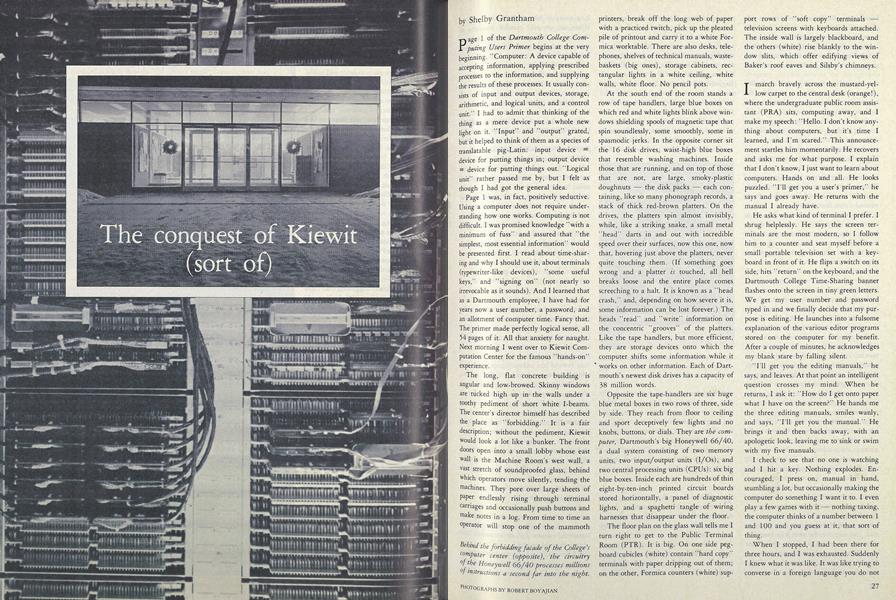
The long, flat concrete building is angular and low-browed. Skinny windows are tucked high up in the walls under a toothy pediment of short white I-beams. The center's director himself has described the place as "forbidding." It is a fair description; without the pediment, Kiewit would look a lot like a bunker. The front doors open into a small lobby whose east wall is the Machine Room's west wall, a vast stretch of soundproofed glass, behind which operators move silently, tending the machines. They pore over large sheets of paper endlessly rising through terminal carriages and occasionally push buttons and make notes in a log. From time to time an operator will stop one of the mammoth printers, break off the long web of paper with a practiced twitch, pick up the pleated pile of printout and carry it to a white Formica worktable. There are also desks, telephones, shelves of technical manuals, wastebaskets (big ones), storage cabinets, rectangular lights in a white ceiling, white walls, white floor. No pencil pots.
At the south end of the room stands a row of tape handlers, large blue boxes on which red and white lights blink above windows shielding spools of magnetic tape that spin soundlessly, some smoothly, some in spasmodic jerks. In the opposite corner sit the 16 disk drives, waist-high blue boxes that resemble washing machines. Inside those that are running, and on top of those that are not, are large, smoky-plastic doughnuts the disk packs each containing, like so many phonograph records, a stack of thick red-brown platters. On the drives, the platters spin almost invisibly, while, like a striking snake, a small metal "head" darts in and out with incredible speed over their surfaces, now this one, now that, hovering just above the platters, never quite touching them. (If something goes wrong and a platter is touched, all hell breaks loose and the entire place comes screeching to a halt. It is known as a "head crash," and, depending on how severe it is, some information can be lost forever.) The heads "read" and "write" information on the concentric "grooves" of the platters. Like the tape handlers, but more efficient, they are storage devices onto which the computer shifts some information while it works on other information. Each of Dartmouth's newest disk drives has a capacity of 38 million words.
Opposite the tape-handlers are six huge blue metal boxes in two rows of three, side by side. They reach from floor to ceiling and sport deceptively few lights and no knobs, buttons, or dials. They are the computer, Dartmouth's big Honeywell 66/40, a dual system consisting of two memory units, two input/output units (I/Os), and two central processing units (CPUs): six big blue boxes. Inside each are hundreds of thin eight-by-ten-inch printed circuit boards stored horizontally, a panel of diagnostic lights, and a spaghetti tangle of wiring harnesses that disappear under the floor.
The floor plan on the glass wall tells me I turn right to get to the Public Terminal Room (PTR). It is big. On one side pegboard cubicles (white) contain "hard copy" terminals with paper dripping out of them; on the other, Formica counters (white) support rows of "soft copy" terminals television screens with keyboards attached. The inside wall is largely blackboard, and the others (white) rise blankly to the window slits, which offer edifying views of Baker's roof eaves and Silsby's chimneys.
I march bravely across the mustard-yellow carpet to the central desk (orange!), where the undergraduate public room assistant (PRA) sits, computing away, and I make my speech: "Hello. I don't know anything about computers, but it's time I learned, and I'm scared." This announcement startles him momentarily. He recovers and asks me for what purpose. I explain that I don't know, I just want to learn about computers. Hands on and all. He looks puzzled. "I'll get you a user's primer," he says and goes away. He returns with the manual I already have.
He asks what kind of terminal I prefer. I shrug helplessly. He says the screen terminals are the most modern, so I follow him to a counter and seat myself before a small portable television set with a keyboard in front of it. He flips a switch on its side, hits "return" on the keyboard, and the Dartmouth College Time-Sharing banner flashes onto the screen in tiny green letters. We get my user number and password typed in and we finally decide that my purpose is editing. He launches into a fulsome explanation of the various editor programs stored on the computer for my benefit. After a couple of minutes, he acknowledges my blank stare by falling silent.
"I'll get you the editing manuals," he says, and leaves. At that point an intelligent question crosses my mind. When he returns, I ask it: "How do I get onto paper what I have on the screen?" He hands me the three editing manuals, smiles wanly, and says, "I'll get you the manual." He brings it and then backs away, with an apologetic look, leaving me to sink or swim with my five manuals.
I check to see that no one is watching and I hit a key. Nothing explodes. En- couraged, I press on, manual in hand, stumbling a lot, but occasionally making the computer do something I want it to. I even play a few games with it nothing taxing, the computer thinks of a number between 1 and 100 and you guess at it, that sort of thing.
When I stopped, I had been there for three hours, and I was exhausted. Suddenly I knew what it was like. It was like trying to converse in a foreign language you do not know very well. Only worse, because gesturing isn't allowed, and you can't draw pictures. But that is what it is, learning a new language. Visions of quick and easy mastery faded. Learning to use the computer was going to require some heavy-duty study.
THE sobering fact is that Dartmouth's computation center is probably the easiest place in the country to learn the difficult art of using a computer. (And it is difficult, though perhaps only in the way that learning to drive a car seems impossible to those who have not done it yet and mindlessly simple to those who have.) When the Dartmouth computer system was first designed back in the early sixties by mathematics professors John Kemeny and Thomas Kurtz, it was with the non-scientist especially in mind, and Kiewit has always stressed "user friendliness."
To overcome the two major obstacles to convenient computing, Kemeny and Kurtz had to design a computer system that would, first, respond rapidly enough to prevent the user's forgetting what the problem was or losing interest in solving it via computer, and second, treat with the user, especially the non-scientific user, in a language simple enough to be mastered without trauma. Systems then in use operated on the principle of "batchprocessing." Users stood in line for time on the computer, which simply took each person's problem in turn. Two hours was considered a good turnaround time Jon such systems, and the lapse of two days between putting something in and getting something out was not unusual. The various languages then available for use on computers were all highly technical codes fraught with obscure constructions.
Time-sharing a relay system of computer response based on the differential between relatively slow typing times at the user end and amazingly fast processing times at the machine end was the solution to the first problem. The time-sharing idea is that instead of taking each user in turn a computer is programmed to cycle among its users, giving out time like a parent dividing jelly beans: one for you and one for you, two for you and two for you. Given that computers are capable of processing a couple of million instructions per second, the wait for the next jelly bean in a time-sharing system is seldom appreciable, even though a couple of hundred users may be on the system simultaneously. While some are busy scratching their heads and pecking at their keyboards, the computer has plenty of time to dash off several million tasks for others. Solving the second problem was a matter of designing a simplified, user-friendly computer language that sounded a lot like everyday English. Known now all over the world as BASIC (Beginner's All-Purpose Symbolic Instruction Code), it was developed in 1963-64.
Both the time-sharing system and BASIC are forms of what is known in the computer world as "software" the programs, or sets of sequential instructions devised to manipulate the circuitry of the "hardware" the actual machinery itself. In a culture that venerates technology to the extent ours does, computer hardware gets much better press than computer software does. Without denying the wonder of the technology that allows one to assemble in a manageable space the zillions of circuits required to make a computer capable of all the things it is capable of, it is fair to say that a general understanding of the way the hardware functions is not beyond any of us.
A computer is a machine with many, many electronic circuits, connected in an admittedly complex maze of tiny pathways for electricity, which can be sent through them to cells which can thereby be turned "on." They can also, of course, remain "off." They have, obviously, two states, on and off; hence the term binary. The cells are known as "bits," and with a sufficiently long string of bits, each of which can be either on or off, massive numbers of different on/off patterns can be constructed and each assigned a value in some system.
If we call off "0" and on "1," as computer folk do, then the patterns can be expressed as numbers. A program can then be written to "teach" the computer about, say the alphabet. If a machine can handle 36 bits (as Dartmouth's current time-sharing computer can), then 000000000000000000000000000000000001 could be assigned the value "a." 000000000000000000000000000000000010 could be "b," and so on, moving the 1 over to the left one digit at a time. Through electric connections with a printer, the machine could be made to cause "a" or "b" to be printed each time it noted the "a" or "b" pattern of Is and Os while running the alphabet program. Other patterns could be devised for capitals. The computer could then be made to operate on the characters it had been taught to recognize, to do things such as alphabetize them, for instance. People who understand permutations and combinations better than I can get 26 characters into a binary system using fewer than 26 bits each; the average character, or "byte," uses some 8 bits.
Each brand of computer comes to the purchaser with its own machine language the set of rules by which, through teletypewriters electronically connected to the machine, the computer circuits are manipulated into doing things such as scanning rows of bits and noting and recording which are on and which off. But beyond that elementary programming, a new computer is an empty box into which software must be put. First, compilers have to be written and loaded in. A compiler is a program that translates a given higher level language ALGOL, FORTRAN, BASIC, COBOL, SNOBOL into the machine language so that other enabling programs can be written without each time having to go through the tedious process of telling the machine, so to speak, circuit-by-circuit whether to be on or off in order to establish a character in order to compile an instruction.
Systems programs the carefully devised, ingenious sequences of tiny steps leading a computer's, circuitry through wonderful mazes to instantaneous and almost magical results are awe-inspiring. Listings of systems programs commonly run to a hundred pages and not uncommonly to three feet or more of stacked computer paper. Programming a system is significantly different from programming a problem. In the latter case, a "casual"
programmer is using various systems programs to construct for himself or herself a specialized program to do an individual job, such as set up the Tuck School's famous business game. That applications program sets up a fictional clock-manufacturing business complete with buying and selling and accounting factors, even random industrial accidents such as strikes and factory fires, for teaching purposes. It makes use of various systems programs, such as BASIC, some telecommunications software, and various of the editor programs that handle data. Or systems software such as the College's new General Ledger Program might be utilized in an applications program designed to keep track of a specific department's foreign study expenses, for example. Software development is the most impressive and the most difficult to appreciate of the tasks in computerland. To understand the role of software is to understand with your gut (not only with your terrified brain) that people really do still control machines.
THEY usually do it in basements and late at night. The reason for programming systems in basements is not clear, but one of the reasons for doing it at 11:00 p.m. rather than 11:00 a.m. is that nobody else is using the computer then and it responds faster, which is important to people who use it a lot and know themselves how to respond quickly.
In 1959, Kemeny and Kurtz had watched Dartmouth undergraduates create highly successful programs on a tiny LGP-30 computer, and when they decided to create a time-sharing system and a new language, they chose to do it with a facultystudent coalition and a medium-sized machine, a GE-235 computer funded by the National Science Foundation. All the experts said that such a system could be designed, if at all, only on a large, expensive computer and only by professional computer scientists. The professors did the major work on the new language, leaving the bulk of the time-sharing development to the undergraduates. As everyone knows, they rose to the occasion magnificently.
The use of undergraduates as wageearning software development staff unknown elsewhere then and now is firmly fixed in Dartmouth computing tradition, despite the phenomenal growth of Kiewit and the hiring of a good many fulltime professional programmers. The undergraduate programmers known locally as sysprogs moved with the rest of the computing staff when in 1966 the College, with the help of N.S.F., General Electric, and Evelyn and Peter Kiewit '22, acquired a bigger and better computer, a GE-635, and built Kiewit Computation Center to house it. There, to this day, in a large room in the basement known as the bullpen, the sysprogs hang their hats (and their hockey skates, peanut butter, sci-fi paperbacks, empty kegs, old Halloween costumes, Rubik's cubes, and unwashed mittens).
WHAT they do down there is learn how to write systems programs. As firstyear students, they have gone through a couple of winnowing non-credit courses in the local machine language and PL/1, the language in which most of the systems programs at Dartmouth are written. As sophomores and juniors, the new sysprogs try their hands at various assigned or selfselected systems programs, starting small and working up. By the time they are seniors, they are highly skilled professionals in great demand by industry.
Currently, there are six full-time programmers and a dozen or so sysprogs at Kiewit. Many of the full-timers are former sysprogs, such as Michael Morton '80, who cut his programming teeth on a small, playful program that plotted a picture of a clock on a graphics screen terminal and moved the minute and hour hands around and ticked off the seconds. It was perhaps two pages long, he recalls, some 120 steps.
As a senior, Morton made what he considers his major contribution as a sysprog, rewriting the Foreground Simulator Program (known now as the Background Program). He explains that if you have a long program that will take forever to run and you do not want to sit and watch the terminal, you can submit your program to the Background Program, which "coddles" it, saving any output it produces for you somewhere or printing it on a printer. "The original program that did that was unspeakably bad," says Morton. "It was leftover from a generation of programmers who took great glee in doing things not just to be clever but sometimes to be intentionally obscure. The error messages in the Foreground Simulator, for instance, were very cryptic. You would get something like 'Incompatible mode specification,' instead of 'You have described your tape as having this attribute and this attribute, and these two are incompatible.' I had to spend half an hour reading the program just trying to figure out what situations made it produce that message."
Current sysprog Eric Leventhal '83 says his first Kiewit project was a program to provide a general data base for the hospital. Known as "Superman," the program proved too ambitious an effort and was abandoned. He next spent some time working on a program to connect other programs together. Now he is deep into a third version of a program known as MAIL. Begun by sysprog Betsy Hanes '81, it is designed to facilitate communication among computer users. A telephone, answering service, and secretary rolled into one, it would allow a user to type in a message "Can you come to a meeting at Collis at 2:00 Friday afternoon?" for instance and instruct the computer to send it to any number of other people who frequently use the computer. The next time each of the others signed on, she or he would automatically be told about the message and could then respond via computer. The first version of MAIL worked with user numbers only; the second, though it taught the computer to attach numbers to names so the operator could forget all those numbers, was obscure and difficult to use. The version Leventhal is working on will, among other things, allow names to be connected to numbers and also allow the several numbers a single user may have all to be connected to his or her name for MAIL purposes. It would also allow message recipients to save the messages for looking at again later. Leventhal says he is particularly interested in the true Kiewit tradition in making the program useful for a person who hardly knows the system at all. One of the challenges he faces is the usual one of figuring out how to write a program that will cover for users' errors. If, for instance, MAIL, which has been programmed to respond to full names only, is called up and instructed to take a message to "Rich," should Leventhal have the program simply not send the message, or should he have it say to the user, somehow, "Who's Rich?"
DARTMOUTH'S sysprogs have over the years left a collection of colorful legends behind them. Sidney Marshall '65, an irreverent and mathematically brilliant sysprog with a penchant for defeating locks, seems to have "set a certain tone for the sysprogs," according to Stephen Garland '63, a former sysprog now teaching mathematics and chairing the Computer and Information Sciences Program at the College. Sidney stories, real and apocryphal, are legion. Sidney is credited with larkishly unlocking any number of impregnable doors at the College and with writing brilliant computer programs that wreaked amusing havoc in various data processing centers across the country.
One favorite story, from the days before computer programs could be copyrighted, concerns sysprog resentment at the freedom with which Dartmouth's new time-sharing software was lifted and sold by computer companies who gave little or no credit to the Dartmouth undergraduates who had created most of it. Under Sidney's leadership, sysprog outrage was creatively channeled into a brilliantly disguised instruction buried deep in the code of the Dartmouth ALGOL compiler (an oftborrowed part of the system). The instruction caused "Dartmouth ALGOL" to be printed as part of the command that called up the ALGOL program. It took computer company professionals several years of work to crack the students' code, during which time the companies had to live with "Dartmouth ALGOL" as part of the software they were trying to peddle as their own.
Some people even said there wasn't really a computer at the College at all. It was just Sidney in a black box.
The sysprogs tended to live in the basement and not to care very much what they looked like in the early days, and among them were a fair number of computer "jocks" (known elsewhere as "hackers"), many of whom flunked out of everything else repeatedly. Temper tantrums were not unheard of in the basement, nor were ingenious practical jokes. It is stoutly maintained that a terminal was once found atop Bartlett Tower, with phone lines running to the nearest building. One sysprog lived in a teepee on the golf course when he wasn't living in the basement, and peddled peanutbutter-and-jelly sandwiches from his desk in Kiewit. One had a glass eye and sold Oriental rugs on the side.
"Sysprogs tend to be somewhat eccentric," explains Brig Elliott '76, who used to be one and is now manager of software development at Kiewit. "A lot of Phi Betes couple of valedictorians, surprisingly large number of musicians. One guy joined Pilobolus. Surprisingly few nurdish straight-engineering types among the sysprogs. Most major in math or computer science, but quite a few have been in English, music, psychology, religion. It used to be that a fair number flunked out, the monomaniacs. But Kiewit doesn't allow that now. Not that it was any great loss. Programs, good programs, have to be written so that the people who have the job of updating them after you graduate can understand them easily. They have to be carefully annotated in English. The monomaniacs do the worst job at that; they tend to have tricky minds, too tricky."
Though' there are still fads among the sysprogs juggling was in for a time, and so was international folk-dancing Kiewit people agree that sysprogs have become steadily less outrageous. According to Morton, "There's a growing group who, although they're no less qualified or talented, have decided that systems programming is not the be-all and end-all of everything." The change clearly makes Morton a bit wistful. "Some do remarkably good work, who never go on work binges and never slack up. That's very different. That's much closer to the outside world of programming, where you have regular hours."
IT all seems to be part of a general trend toward "regularity" in computing, a trend which has two components: decentralization in hardware systems and centralization in software development. William Arms, Kiewit's director, speaks of the potential of small computers departmental minis and micros: "When I came here in 1978, there was essentially no computing at Dartmouth other than the big system here and the administrative one at McNutt. Dartmouth has been buying two substantial mini-computer systems every year since then, and there are six installed at this moment. I don't know how many personal computers there are on campus at present, but it's somewhere between 25 and 50. This time next year, there will be over 200, I'm sure."
This trend is basically a function of the plummeting of hardware costs caused by the development of micro-chip and printed circuitry techniques, which have made possible the manufacture of circuitry a millionth of the size formerly necessary. According to Arms, the cost of computer manufacture has dropped by a factor of four in the past five years, and he looks to see it plunge by another such factor in the next five or six years.
Networking is the big new thrust at Kiewit. As Richard Brown, Kiewit's manager of telecommunications and micro-computers, explains, "In the old days (defined as year before last), computing at Dartmouth was one central machine inside Kiewit, and a bunch of terminals all over the world attached to it. Now there is still a big machine, but there are a lot of other machines, too: the three made by Prime, the new Honeywell we're getting to beef up services, the one the library is getting, the PDP-11 at Thayer, the one over in Community Medicine. Our goal is to tie them all together with a 'bus' a cable pathway. When you get onto the pathway, you don't have to go to the big one, as you did before; you can go to any machine that's attached to the pathway."
The plan is to add more and smaller computers to the line between the terminal and the big computer, the "mainframe," thus taking loads off it and saving it for heavy work. Many of these buffering small computers will be "dedicated" given over solely to certain large projects (such as the automation of the library's card catalog). Once the complex interconnections are mapped out and implemented, they will also act as safety valves in a system roughly analogous to a string of Christmas tree lights wired in parallel (so that if one bulb burns out the others stay lighted) instead of in series (so that if one goes they all go). If one user bolixes up something on a small computer, or its hardware fails, all the other people using the system at the same time need not also be dragged into the limbo of a systems crash, in which the computer stops functioning for some period of time.
The decentralizing movement away from one monolithic, expensive machine toward many smaller, inexpensive computers is sure to lead, Arms says, to a micro-computer on every desk at the College within the next couple of years. While that may strike terror into the hearts of some of us, there is in software development a movement reassuring in a perverse sort of way in the other direction. The great mass of enabling programs that have been generated in the past 15 years have, in the main, accomplished the big clunky tasks and designs that make computer systems function smoothly. Modification, not creation, is now the major activity of programmers, and the guidelines are sophistication, refinement, greater user friendliness, and inevitably specialization. This means more bureaucracy, more direction from the top, more structured, assigned, and piecemeal work responsive to the demands of casual users and the marketplace, and less flamboyant, unscheduled, individualistic, "great idea" programming.
Back when computers were expensive, you built a system and the humans adapted to it. Now that's reversing. Computer companies, besides proliferating madly, are also beginning to survey us casual users and build systems to our needs. As things get more specialized and complex and fewer computer people know everything there is to know about computing, using computers will doubtless pass into the realm of familiar technology, as have the telephone, color television, the emissions-controlled car things that we all feel perfectly easy using and not particularly guilty about not being able to explain or repair, since nobody else seems to be able to, either.
Spare disk-pack doughnuts, emptied of theirstorage platters, sit atop their washingmachines in the machine room at Kiewit.
Dartmouth's mainframe hardware sixbig blue boxes is shown here with oneof its light-studded diagnostic panels open.
The Public Terminal Room at Kiewit is a tidy, white world where the casual userputs the College computer through its paces with the touch of a fingertip.
The office of the chief systems engineer at Kiewit belies reassuringly the terminal tidiness at the user end of things.
Behind, the forbidding facade of the College'scomputer center (opposite), the circuitryof the Honeywell 66/40 processes millionsof instructions a second far into the night.
More From This Issue
-
 Feature
The 'real world': Ivies in the cold, cold ground
January | February 1982 -
 Feature
Welcome to the dark places
January | February 1982 -
 Article
A Lesson in Survival
January | February 1982 -
 Class Notes
1952
January | February 1982 -
 Article
Young entrepreneur happy with "inflation"
January | February 1982 -
 Class Notes
1961
January | February 1982